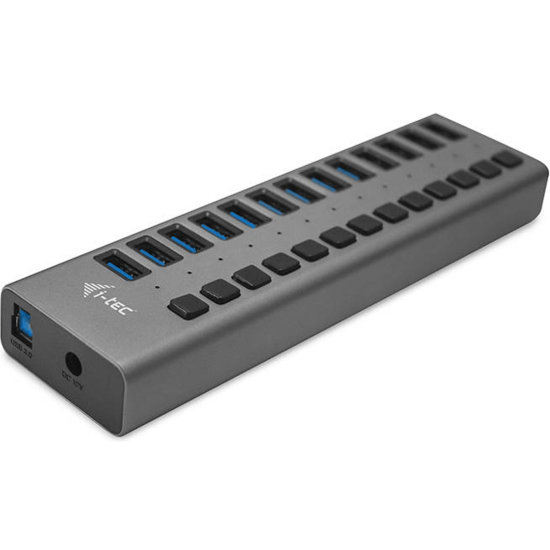
13 Port Tec USB3.0 Charging Hub With Power Adapter by i-tec
- Be the first to review
- Item Number: 463-0001
- Part Number: U3CHARGEHUB13UK


No longer available. See alternative options
Key Features
- 13 port charging hub
- Provides up to 10 W of charging power for each port
- USB3.0 interface and backwards compatibility with USB2.0 / 1.1
- Easy use with plug and play compatibility
- Ideal for laptop Ultrabook tablet PC, Windows Mac Linux
See product description
Similar Products
-
 Kensington CH1000 4-Port USB 3.0-A & C Hub
IN STOCK
€ 62.40 (incl. VAT) -
 StarTech 4-Port SuperSpeed Mini USB3.0 Hub - Black
IN STOCK
€ 24.36 (incl. VAT) -
 StarTech 7-Port Commercial Metal USB3.2 Super Speed Hub
IN STOCK
€ 100.65 (incl. VAT) -
 StarTech 4-Port USB2.0 Hub - Black
IN STOCK
€ 28.15 (incl. VAT) -
 StarTech 4-Port USB C with USB A Port - Black, Grey
IN STOCK
€ 41.93 (incl. VAT) -
 Startech Dual Monitor USB 3.0 Docking Station
IN STOCK
€ 94.44 (incl. VAT) -
 NGS USB3.0 4 Port Hub - Plug and Play USB Powered
IN STOCK
€ 18.31 (incl. VAT) -
 StarTech 10 Port USB Hub with Power Adapter - Black
IN STOCK
€ 228.75 (incl. VAT) -
 StarTech 4 Port Portable USB2.0 Hub with Built-in Cable
IN STOCK
€ 14.20 (incl. VAT) -
 StarTech 4-Port USB3.2 Type A Hub - White
IN STOCK
€ 42.66 (incl. VAT) -
 NGS IHUB8, 8 Ports USB 3.0 Hub with Power Adapter 5V/3A
IN STOCK
€ 40.42 (incl. VAT) -
 Startech 2-port Multi Monitor Adapter USB-C to 2x HDMI Hub Splitter
IN STOCK
€ 73.47 (incl. VAT) -
 Adesso 7-Port USB 3.0 Hub w/AC Power Adapter
IN STOCK
€ 40.06 (incl. VAT) -
 StarTech 4-Port USB C with USB-A Hub - White
IN STOCK
€ 41.11 (incl. VAT) -
 3 Port StarTech USB Type C To 3x HDMI Multi Monitor Adapter Hub
IN STOCK
€ 65.05 (incl. VAT)
Details
This HUB offers thirteen USB 3.0 ports with the Plug & Play function and with standard USB charging – the HUB automatically detects whether a device for USB charging is connected. As this HUB is equipped with thirteen USB 3.0 ports, it can charge up to thirteen devices at a time. The USB 3.0 interface is especially important for data transfers from USB 3.0 memory cards and flash drives, where its high transfer rate is most useful. An external power adapter is included in the package to guarantee stable HUB performance and charging from the USB ports, providing up to 10 W of charging power for each port.
This HUB does not require the installation of drivers. You will just connect it by the USB cable to your computer and immediately you can start using it. This HUB has a built-in overcurrent protection of your computer in case of short connection on the peripheries. The interface is compatible with USB 2.0 / 1.1.
The HUB is installed automatically from the system and does not require any drivers. Connect the AC adapter connector to the HUB and the AC adapter to a 230 V outlet. Then connect the HUB via the USB cable to a free USB port (USB 3.0, 2.0 or 1.1 standard) on your laptop/PC and follow the instructions on the screen. The HUB will be installed and displayed in the Device Manager as “General USB Hub” and “General USB SuperSpeed Hub”.
Long product description: i-tec USB 3.0 Charging HUB 13port with power adapter 60 W, 13x USB 3.0 charging port, ideal for laptop ultrabook tablet PC, Windows Mac Linux.
Specifications
| INTERFACE | USB3.0 |
| PORTS | 13 |
| COLOR | Grey |